Privacy Peek
Instrumenting Rooted Android Devices to Measure Permission Use and File-Access Patterns in Modded vs Official Apps
Introduction
▲During my work on an Android Custom ROM, I noticed that many applications requested unusually broad permissions. For example, an third party application manager app was granted the ability to control Bluetooth and Wi-Fi by default: an unnecessary and suspicious capability. This observation raised concerns about how many other applications might be overreaching in their permission requests.
Manually inspecting each application’s manifest and runtime behavior, however, would have been extremely time-consuming. To streamline this process, I began developing an application capable of automatically listing all installed apps along with their declared and requested permissions.
While working on this application tool, I realized that permission requests alone might not provide the full picture of an app’s behavior. Some applications could request innocuous permissions but still perform sensitive operations at runtime, such as accessing, creating, modifying or deleting files This insight led me to investigate mechanisms for monitoring actual file system activity on Android.
Through this exploration, I discovered the fanotify subsystem in the Linux kernel, which provides hooks for monitoring file access events.
Leveraging fanotify, I developed a custom binary called FaNoMonitor (short for Fanotify Monitor).
This binary serves as a system-level watcher, capturing detailed logs of file operations performed by applications.
Building on these components, I created Privacy Peek, a Magisk-installed system application that integrates with FaNoMonitor to combine available permission metadata with observed file-access patterns across Android apps. This instrumentation forms the foundation for a systematic investigation into the behavioral differences between official and modded applications.
In summary, this research makes the following contributions:
- Privacy Peek: a Magisk-based system application that enumerates all installed apps and extracts their declared and runtime permissions.
-
FaNoMonitor: a custom Linux
fanotify-based binary that captures supported open, access, modification and close events on monitored paths. Creation and deletion coverage requires additional kernel support. - Validated instrumentation framework: demonstrated on Xiaomi Onclite (Android 14, Ethereal OS) and OnePlus 3T (Android 11, LineageOS).
- Reproducible methodology: enables large-scale comparative studies of official versus modded applications, laying the groundwork for deeper empirical analysis.
Evidence scope: This page describes the instrumentation and reported prototype setup. Raw app-pair logs, the complete sample inventory and measured comparison outcomes are not provided with this page; its diagrams explain the method and do not establish malware prevalence or a verdict on any app.
Background & Related Work
▼Android Permission Model
Android’s security model is primarily enforced through a permission-based mechanism.
Applications must declare the permissions they require in their AndroidManifest.xml, which are then requested at install time (pre-Android 6.0) or dynamically at runtime (Android 6.0+).
Runtime permissions provide more granular user control, but privileged system applications can still leverage hidden or internal permissions that are inaccessible to normal third-party apps.
To access such privileged capabilities in this research, a dedicated privacypeek.xml file was placed at
/system/etc/permissions/ through the Magisk module template.
This file allowlists requested privileged permissions for com.iamcod3x.privacypeek:
<?xml version="1.0" encoding="utf-8"?>
<permissions>
  <privapp-permissions package="com.iamcod3x.privacypeek">
    <permission name="android.permission.GET_APP_OPS_STATS"/>
    <permission name="android.permission.PACKAGE_USAGE_STATS"/>
    <permission name="android.permission.READ_PRIVILEGED_PHONE_STATE"/>
    <permission name="android.permission.INTERACT_ACROSS_USERS"/>
  </privapp-permissions>
</permissions>
Effective access must be verified on the device. An XML entry alone does not override every permission's protection level, signature requirement, partition restriction or app-op setting. See the AOSP privileged permission allowlist documentation.
Rooting and Magisk Capabilities
Root access is a prerequisite for bypassing Android’s default application sandboxing. This research uses Magisk. A reproducible run must record the exact per-device configuration, including:
- Magisk version and module versions.
- Ramdisk installation details and whether Zygisk is enabled.
- SELinux status; the prototype setup reported here used permissive mode.
Magisk provides a systemless rooting mechanism, enabling the injection of additional permissions, modules and binaries without altering the system partition. This flexibility makes it ideal for building reproducible instrumentation frameworks.
Existing Monitoring Tools
Prior work such as PrivacyDashboard attempted to provide visibility into Android app permissions. However, these tools exhibit significant limitations:
- Limited monitoring scope (permissions only, without file access behaviors).
- Lack of ongoing development (last update over three years ago).
- Restricted to visible permission states, with no kernel-level instrumentation.
These limitations motivated the development of a deeper, kernel-assisted monitoring solution that extends beyond manifest declarations.
Linux Fanotify for System-Level Monitoring
Linux provides several file monitoring APIs (inotify, dnotify, fanotify).
This project uses fanotify to observe supported events on explicitly marked files, directories or mounts.
It provides partial file-system visibility rather than a complete trace of every operation.
FAN_CREATE and FAN_DELETE were added upstream in Linux 5.1;
they must not be assumed available on the reported 3.18 and 4.9 kernels without documented backports or supplemental instrumentation.
Fanotify availability must be checked in each device's kernel configuration. In this prototype, a custom kernel was built with the following configurations enabled:
CONFIG_FANOTIFY=y
CONFIG_FANOTIFY_ACCESS_PERMISSIONS=y
The modified kernel source was derived from ViP3R-KERNELs (OnePlus 3T, MSM8996 platform) for the reported Android 11 (LineageOS(MicroG)) setup. Other device and kernel combinations require their own build and event-coverage checks.
This kernel-level enhancement enables FaNoMonitor, the custom binary developed in this work, to capture and log file system activities in real time, complementing Privacy Peek’s permission tracking capabilities.
Design Goals
▼The design of Privacy Peek and its associated monitoring framework was guided by several key goals to ensure practicality, completeness and extensibility.
Operate on Real Devices
Unlike emulator-based studies that may not reflect real-world conditions, this research is conducted on physical devices:
- OnePlus 3T: LineageOS with MicroG, Android 11, Kernel 3.18.
- Xiaomi Onclite (Redmi 7): Ethereal OS, Android 14, Kernel 4.9.
Both devices are rooted with Magisk, enabling system-level monitoring capabilities.
Comprehensive App Coverage
The framework is designed to enumerate and analyze all installed applications, both official apps from trusted sources and modded/pirated apps from unverified origins. This inclusive scope ensures meaningful comparisons between the two ecosystems.
Permission and File-Access Visibility
The system captures:
- Declared and runtime-granted permissions.
- Supported file-system events on marked paths, with event types recorded per kernel.
- Process metadata linked to app identities when attribution is available.
Extensibility for Future Enhancements
The architecture is designed with extensibility in mind. A future enhancement under development involves integrating AI-driven behavioral watchers capable of flagging apps that exhibit suspicious or shadow activity beyond their declared scope. This forward-looking design ensures that Privacy Peek can evolve alongside the dynamic Android threat landscape.
Together, these design goals establish the foundation for the System Architecture described in the next section.
System Architecture
▼The architecture of Privacy Peek is designed to integrate seamlessly with rooted Android devices, combining available privileged Android APIs with kernel-level monitoring of selected file-system paths. The system consists of four primary components and a log collection pipeline.
System Components
- Privacy Peek (System App): Installed as a privileged app via Magisk, responsible for listing all installed apps and managing the UI.
- Permission XML Configuration: A configuration file placed in
/system/etc/permissions/allowlists requested privileged permissions. Effective grants and app-op access must be checked on each ROM. - FaNoMonitor Binary: A custom Linux fanotify-based logger that records supported file events on marked paths. Coverage depends on the kernel, event mask and monitor configuration.
- Log Collection Pipeline: Mechanism for storing, filtering and presenting captured events in a structured format.
Interaction Flow
- The test device runs a rooted ROM with Magisk.
- Privacy Peek is installed as a system app via Magisk.
- On first launch, the app requests root privileges in order to:
- Copy
FaNoMonitorbinary into/data/data/com.iamcod3x.privacypeek/files/. - Execute
FaNoMonitorin the background.
- Copy
- FaNoMonitor writes the file events captured on monitored paths into
/data/data/com.iamcod3x.privacypeek/files/FaNoMonitor.log. - Privacy Peek LogReaderActivity parses the log file and filters events per application basis, ensuring that logs are presented in a meaningful and readable format rather than a raw dump.
- The user interface provides:
- Per-app event logs.
- Data usage (Upload/Download) split across Wi-Fi and Mobile Data.
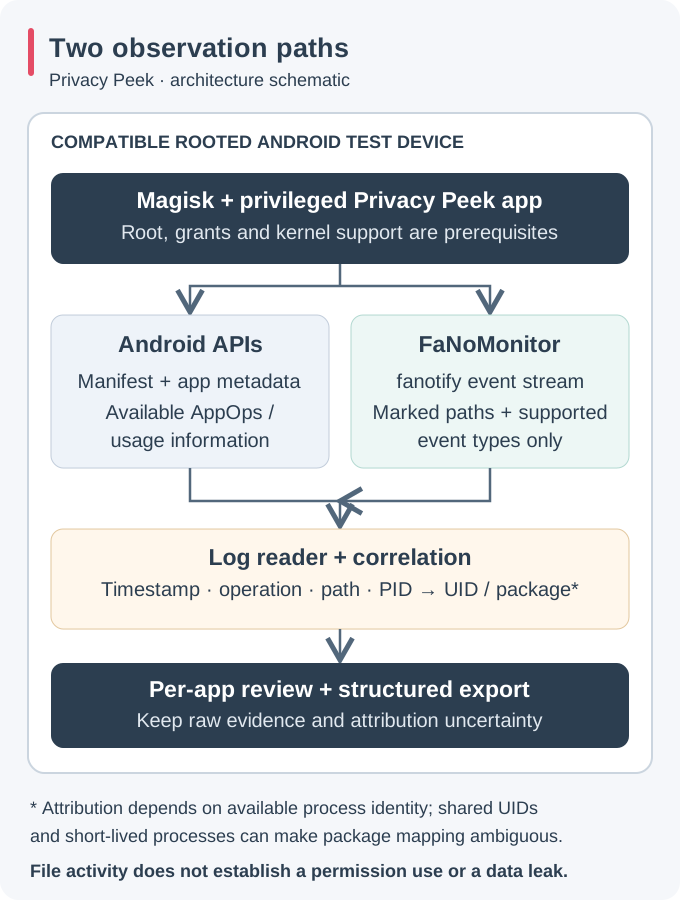
This modular architecture allows the system to function reliably on multiple Android versions and custom ROMs, while ensuring extensibility for future components such as AI-driven activity monitoring.
Implementation
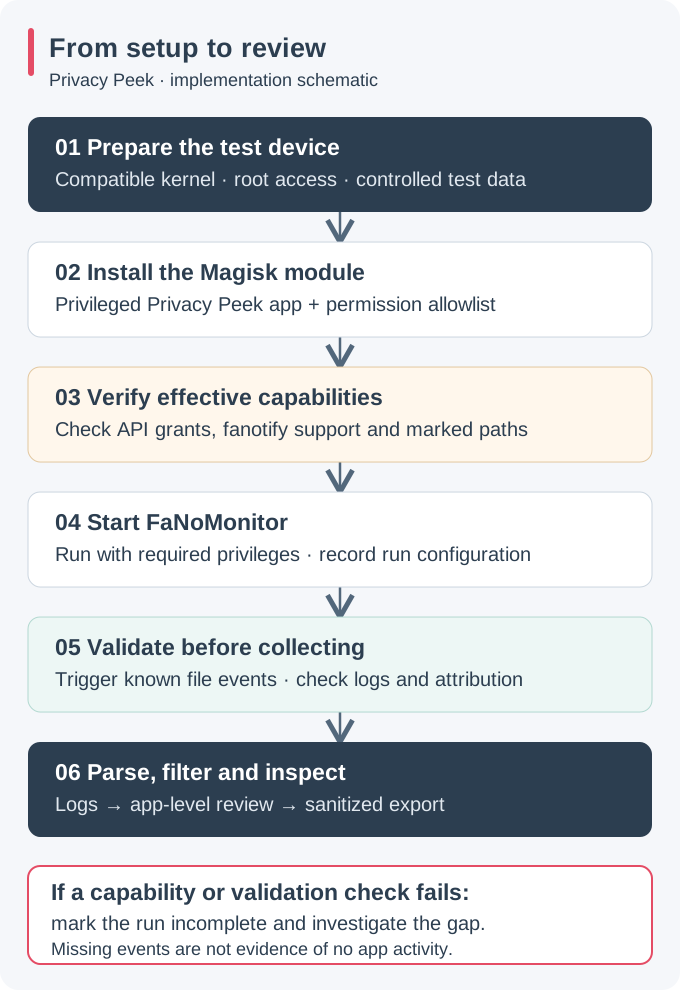
▼The implementation phase focused on integrating Privacy Peek and FaNoMonitor within a rooted Android environment to enable real-time monitoring of application behavior. Two test devices were configured to ensure reproducibility across different Android versions.
Devices and Operating Systems
- Xiaomi Onclite (Redmi 7): Ethereal OS, Android 14, Kernel 4.9
- OnePlus 3T: LineageOS with MicroG, Android 11, Kernel 3.18
Both devices were rooted using Magisk for systemless modifications; the reported prototype used permissive SELinux. The exact Magisk version, Zygisk state, module revision and kernel build must be recorded separately for each device and run.
Integration Steps
- Installing Privacy Peek as a System App
A Magisk module template was created to place thecom.iamcod3x.privacypeekAPK under/system/priv-app/PrivacyPeek/. Privileged placement allows eligible grants; it does not automatically grant every protected API. - Injecting Permission XML
The following file was added at/system/etc/permissions/privacypeek.xmlto allowlist requested privileged permissions for Privacy Peek, subject to device-specific grant checks:<permissions> <privapp-permissions package="com.iamcod3x.privacypeek"> <permission name="android.permission.GET_APP_OPS_STATS"/> <permission name="android.permission.PACKAGE_USAGE_STATS"/> <permission name="android.permission.READ_PRIVILEGED_PHONE_STATE"/> <permission name="android.permission.INTERACT_ACROSS_USERS"/> </privapp-permissions> </permissions> - Compiling and Deploying FaNoMonitor Binary
TheFaNoMonitorbinary was compiled with Android NDK (target API 30) usinggcc -staticto ensure compatibility across both devices. After deployment, it resides in/data/data/com.iamcod3x.privacypeek/files/and executes with root privileges viasu -c ./faNomonitor {targetUid} {Sock}. Reproduction requires the actual NDK revision, compiler, ABI, build command and binary hash; a target API and static-link flag alone do not establish compatibility. - Runtime Integration
On first launch, Privacy Peek requests superuser permission, copies the binary if absent and starts it in background service mode. The logs produced are continuously parsed byLogViewerActivityfor real-time display within the app.
Sample Log Format
The FaNoMonitor binary outputs structured logs capturing the timestamp, process UID/PID and file-operation details. Example excerpt:
[759399613000|PID=6846|UID=10166|PROC=com.iamcod3x.privacypeek|PATH=/system/app/CaptivePortalLogin/CaptivePortalLogin.apk|TYPE=OPEN|PKG=com.iamcod3x.privacypeek]
[1759399613000|PID=6846|UID=10166|PROC=com.iamcod3x.privacypeek|PATH=/system/app/CaptivePortalLogin/CaptivePortalLogin.apk|TYPE=ACCESS|PKG=com.iamcod3x.privacypeek]
These logs are filtered within Privacy Peek on a per-application basis, allowing detailed inspection without overwhelming the user with raw event dumps.
Data Collection & Analysis
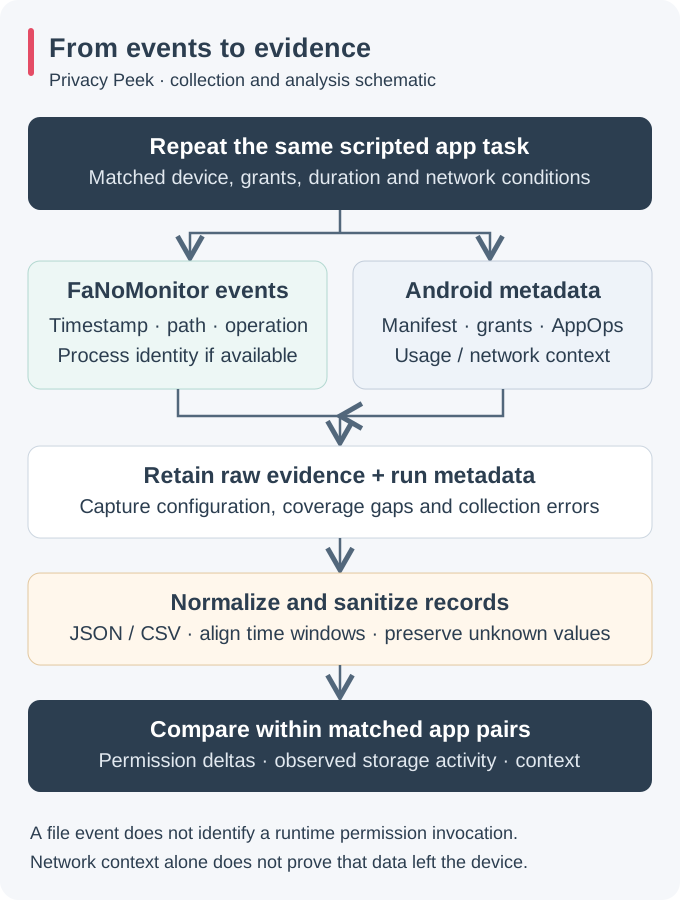
▼With Privacy Peek and FaNoMonitor integrated, the data collection phase focused on systematically capturing permission usage and file-access behavior across both official and modified (modded) applications. The goal was to establish a reproducible framework capable of differentiating behavioral patterns under real device conditions.
Data Sources
- Static Permission Data: Extracted from the Android Manifest of each installed app, including all declared permissions and protection levels.
- Available Android Metadata: Permission grants and accessible
AppOpsManagerrecords supplement manifest data.UsageStatsManagersupplies app-usage context; these sources are not a complete feed of runtime permission requests or invocations. - File-System Activity Logs: Streamed from the
FaNoMonitor.logfile, generated in real time through fanotify hooks on monitored devices.
Collection Process
- Each app on the test devices (both official and modded variants) was launched sequentially using an automated shell script.
- During execution, FaNoMonitor recorded supported events on marked paths while Privacy Peek collected available grants, app-op records and app-usage context. Each run must preserve the event mask and collection gaps.
- Collected logs were synchronized daily to a local analysis workstation using
adb pullcommands. - Data normalization scripts (Python) converted the raw logs into structured JSON entries for aggregation and comparison.
Data Schema
Illustrative normalized record for cross-app comparison; a file event alone does not identify a permission invocation:
{
  "timestamp": "2025-09-22T14:37:04Z",
  "app_package": "com.example.player",
  "uid": 10123,
  "action": "WRITE",
  "file_path": "/storage/emulated/0/Android/data/com.example.player/files/logs/event.log",
  "permission_invoked": null,
  "network_state": "WIFI"
}
Analysis Pipeline
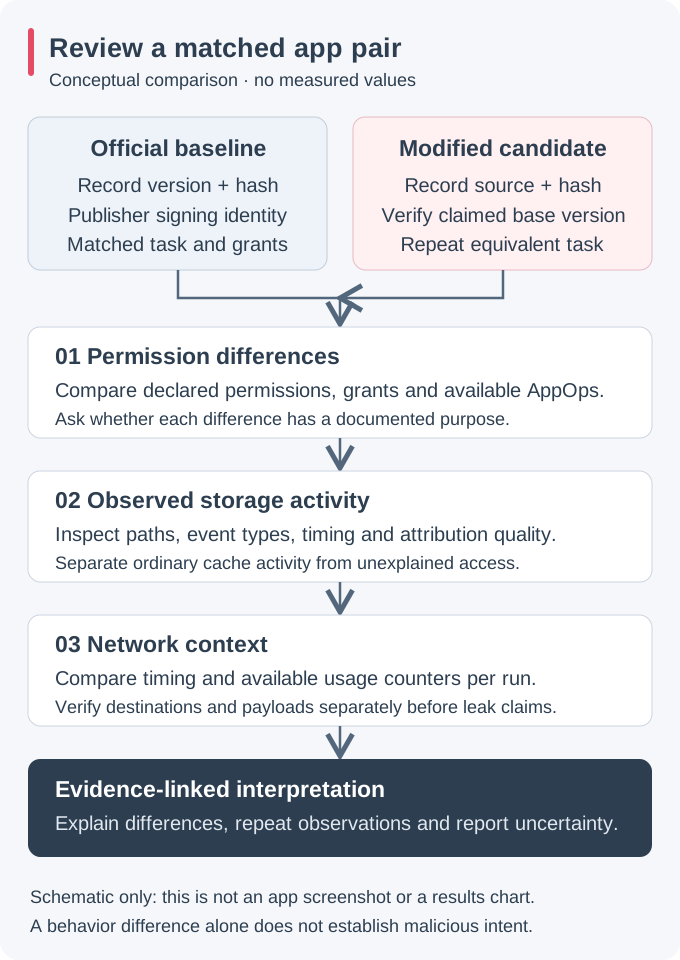
Post-collection, the dataset was analyzed using a combination of shell scripts and Python utilities. The following analysis dimensions were applied:
- Permission and Behavior Review: Compare declared permissions, grants, available app-op records and observed tasks. A file event does not prove which permission was used and missing events do not prove a permission is unused.
- Official vs. Modded Comparison: Compare matched variants under equivalent tasks and conditions, recording version and collection differences before interpreting unexplained activity.
- Network Context: Separate WIFI and MOBILE conditions. Connectivity or usage counters alone do not establish data exfiltration; destination and payload evidence require separate collection.
These analysis dimensions define how collected evidence can be reviewed in Privacy Peek's UI or exported. Reproducible comparison findings require the paired raw records, run metadata and measured outcomes alongside the interpretation.
Limitations
▼While Privacy Peek successfully demonstrates deep system-level monitoring on Android, several limitations define the scope and applicability of this research.
Root Access Dependency
The entire framework depends on root privileges and Magisk integration to operate at the system level. This setup is not feasible for stock or unmodified devices, restricting real-world deployment to developers, security researchers or advanced users with rooted environments.
Android Platform Specificity
The current implementation targets Android’s Linux-based kernel, specifically versions with fanotify support enabled. This limits portability to other mobile ecosystems such as iOS or HarmonyOS, which do not expose equivalent kernel hooks.
Kernel Configuration and Fanotify Granularity
Fanotify coverage depends on kernel support, marks, event masks and mount visibility. Memory-mapped accesses can be missed, events can merge and queue overflow can lose events. Directory marks are not recursive. Creation and deletion event support on the reported older kernels needs explicit verification; a custom build is necessary where the required configuration or backports are absent.
Dataset and Behavior Variability
The reported initial scope was 42 applications and two rooted devices. This count is not a published paired dataset: sample identities, matching details, raw logs and comparison outcomes are not included here. It does not establish representativeness of either ecosystem or statistical significance.
User-Level Usability
Due to its technical setup and requirement for permissive SELinux mode, the framework is not intended for regular end-users. Future iterations may integrate a read-only monitoring layer to enhance accessibility and usability.
Future Work
▼The current version of Privacy Peek establishes a solid foundation for monitoring app permissions and file-access patterns. Several enhancements are planned to expand its analytical capabilities and automation potential.
AI-Based Anomaly Detection
A major goal is to integrate a lightweight on-device AI module capable of detecting anomalous app behaviors. Using log patterns and permission usage frequency, the AI could classify apps as normal, overprivileged or potentially malicious without requiring manual inspection.
Network Traffic Correlation
Combining permission and file-access data with network monitoring (via tcpdump or libpcap)
will enable end-to-end tracing of sensitive data flows. This could reveal
whether certain modded apps perform background data exfiltration through covert channels.
Scalable Dataset Expansion
Future experiments will expand to a dataset of 500+ applications, maintaining a 50:50 ratio between official and modded variants. This scale will enhance statistical reliability and support category-wise risk scoring (e.g., games, finance, productivity, media).
User-Facing Visualization Tools
A web-based or mobile dashboard could provide interactive charts and per-app privacy insights, allowing users to compare permission footprints across categories. This will make Privacy Peek useful beyond the research environment.
Kernel Module Optimization
Optimization of the FaNoMonitor binary and fanotify hooks for newer kernel versions (5.x and above) is planned to reduce performance overhead and ensure compatibility with next-generation Android devices.
Conclusion
▼Privacy Peek presents a reproducible and transparent framework for analyzing Android applications’ permission usage and file-access behaviors under real-world, rooted device conditions. By bridging kernel-level fanotify monitoring with application-layer permission tracking, the system provides visibility that is otherwise inaccessible through conventional sandboxing or static analysis tools.
The methodology enables testing whether modified variants introduce unexplained permission differences or file activity under matched conditions. Conclusions about frequency, impact or malicious intent require the underlying app-pair dataset and reproducible outcomes; this instrumentation description alone cannot establish them.
This research lays the groundwork for continued exploration of behavioral monitoring on mobile devices and forms the basis for a follow-up study: “Hidden Risks in Pirated App Ecosystems: A Comparative Analysis of Permissions, Storage Access and Runtime Behavior.”
Appendix
▼A. Example Log Snippet (Sanitized)
{
  "timestamp": "2025-09-28T14:45:23Z",
  "package": "com.example.modplayer",
  "operation": "WRITE",
  "path": "/storage/emulated/0/Android/data/.temp/cache123.tmp",
  "networkState": "WIFI_ON",
  "uid": 10342
}
B. Example CSV Schema
timestamp,package,operation,path,networkState,uidC. Device Setup Commands
# Enable Magisk module mount
adb push magisk_privacypeek.zip /sdcard/
adb shell magisk --install-module /sdcard/magisk_privacypeek.zip

# Set SELinux to permissive mode
adb shell setenforce 0

# Run FaNoMonitor binary
adb shell su -c "/data/data/com.iamcod3x.privacypeek/files/FaNoMonitor &"

# Fetch generated log file
adb pull /data/data/com.iamcod3x.privacypeek/files/FaNoMonitor.log ./logs/
D. Notes on Data Sanitization
All recorded file paths and package names included in this publication have been sanitized to remove personally identifiable information (PII). The logs are shared solely for structural and methodological reference.
References
▼- Android Developers. “App permissions best practices.” developer.android.com
- Fanotify Main Page. man7.org
- Linux manual pages. fanotify_mark(2): event support and marking scope.
- Android Open Source Project. Privileged permission allowlist.
- Android Developers. AppOpsManager and UsageStatsManager API references.
- Rushikesh Kamewar, Privacy Dashboard